
Marketing Preferences
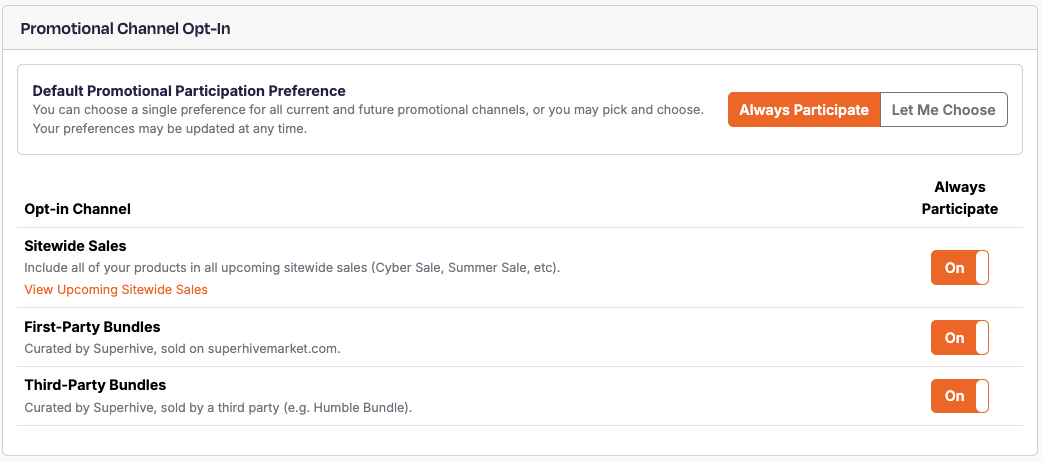
The Marketing Preferences page in your Creator Dashboard lets you tell us upfront which types of marketing opportunities you'd like to be considered for — without us needing to reach out for permission each time.
You can find it in your Creator Dashboard here.
How it works
Superhive regularly curates promotional opportunities for creators and their products — things like sitewide sales, exclusive bundles, and third-party partnerships. We never include a creator's products in these opportunities without their permission.
In the past, that meant contacting creators individually each time an opportunity came up. That process is slow, and it means some creators inevitably miss out — especially when opportunities come together quickly.
The Marketing Preferences page solves this by letting you give us standing authorization ahead of time. When you toggle a preference On, you're letting us know you're open to being included in that type of opportunity without a separate ask. We take that as a green light to consider your products right away.
The options
The preferences page contains a table with three options, each with an Off/On toggle:
| Preference | What it covers |
|---|---|
| Sitewide Sales | Promotional sales events that run across the Superhive marketplace |
| First Party Bundles | Curated product bundles created and sold directly by Superhive |
| Third Party Bundles | Curated product bundles organized in partnership with an outside party |
| Enterprise Orders | Bulk orders negotiated by Superhve |
Bundles in particular are often assembled on tight timelines. Having your preferences set in advance is the most reliable way to be in the running when those opportunities come up.
What "On" means — and what it doesn't
Setting a preference to On does not guarantee your products will be included in every opportunity of that type. Selections are always based on fit, quality, and relevance to the specific promotion.
What it does mean:
- You'll be considered first. Creators with the relevant preference enabled are our starting point when building out any opportunity.
- You won't be left out due to timing. When something moves fast, we work from the pool of creators who've already said yes.
- You maximize your chances. Creators who haven't enabled a preference may still be contacted individually, but there's no guarantee we'll have time to do so before the opportunity is finalized.
By default, all preferences are set to Off. You'll still be contacted for opportunities that are a great fit — it just means we'll need to get your go-ahead first, which may not always be possible in time.
What excluding your products from Enterprise Orders means
Superhive can be contacted directly by Enterprise clients with a request to curate bulk purchase orders based on their needs. Per our terms, we negotiate these orders on your behalf along with any associated volume discounts to build out this order to the benefit of the creator and the customer.
If you choose to opt out of Enterprise orders, we will not include your products when presenting our catalogue to Enterprise customers.
If you do not choose to opt out, your products will be considered for these high volume orders, which could result in significant additional earnings due to the volume of the purchase. We will still notify you via email with details of the order should your products be chosen by the client.
Changing your preferences
You can update your Marketing Preferences at any time from your Creator Dashboard. Changes take effect immediately. If you opt out of a preference type after already being included in an active promotion, please note that the change applies to future opportunities only.