
Selling Lifetime Support and Updates
Why We Don't Recommend Lifetime Promises
We get it — "lifetime support and updates" has become something of an expected default across the Blender ecosystem. Customers have come to anticipate it, and many creators have felt pressure to promise it just to stay competitive. We understand how that happened, but we believe it's a model that ultimately doesn't serve anyone well.
Promising unlimited support and perpetual access to updates creates an open-ended obligation with no financial backing. A customer who purchased a product three years ago for $30 can, under a lifetime model, continue to expect ongoing correspondence, bug fixes, and new features indefinitely, with no additional compensation to the creator. It inevitably leads to creators being crushed beneath the weight of those support and maintenance burdens which leads to creators burning out, innovation stagnating, and products dying. It's truly not sustainable, and it's one of the core reasons we built Support Periods: to give creators a fair, transparent way to define what customers receive and for how long.
We strongly encourage creators to use Support Periods to set expectations that are honest, reasonable, and financially viable for the long term.
It's Still Your Choice
That said, continuing to support customers indefinitely and granting them perpetual access to product files is absolutely still possible on Superhive. We don't restrict it. Creators have the right to make their own promises to their customers, and if you've built your brand around lifetime support, or simply want to offer it for your own strategic reasons, nothing about Support Periods prevents you from doing so.
The rest of this article explains how that works in practice once Support Periods are live.
Providing Lifetime Support
Corresponding with customers is not limited or affected by Support Periods in any way. You can continue to respond to customer messages exactly as you do today.
Once Support Periods launch, messages in your Inbox will display a notice visible to both you and the customer indicating whether their support period is active or expired. This is informational only — it has no effect on what either of you can do in the Inbox. You are completely free to disregard it and continue helping the customer.
You're also welcome to communicate this to customers directly so they know that they can continue to communicate with you without paying again. If you intend to respond to support requests even after a customer's support period expires, you may want to go out of your way to say so in your:
- Product description
- Documentation
- Marketing materials
- Creator emails
There's nothing wrong with making that promise — we just want it to be a deliberate choice, not an accidental default.
Providing Lifetime Updates
Product updates work a bit differently, so it's worth understanding exactly when a customer might lose access to a file before deciding how you want to handle it.
A customer will only see a product version grayed out in their Orders page under all three of the following conditions:
- The product is using Product Versioning
- The customer's support period has expired
- The version's release date is more recent than the customer's support period expiration
If any one of those conditions isn't met, the file will be accessible. With that in mind, here are your options for ensuring past customers always have access to your latest files:
A. Backdate your releases (recommended)
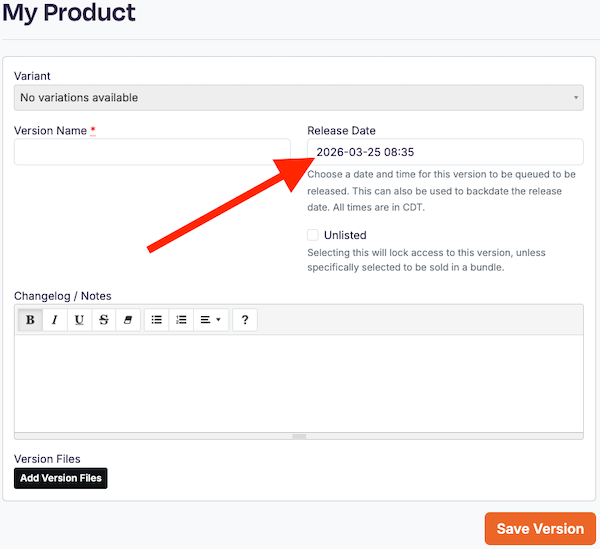
When creating a new product version, there is a date field where you can specify the version's official release date. By setting this date to a point in the past — before any customer's support period would have expired — you ensure that all customers, regardless of their support period status, will have access to that version. This is the cleanest and most reliable approach.
B. Update existing versions directly
Rather than creating new versions, you can add, remove, or replace files within a version that customers already have access to. This does keep files available to all past customers, but it comes with real downsides: you lose the ability to distinguish between different states of your product over time, and it can create significant confusion when customers contact you for support. We'd recommend using this approach with caution.
C. Don't use Product Versioning
Product Versioning is entirely optional. Many products sold on Superhive — particularly those that are complete as-is and unlikely to receive updates — don't use it at all, and that's perfectly fine. If you don't use versioning, customers will never encounter a file they can't access.
A Final Word
We'll say it one more time: we genuinely believe that lifetime support and updates is an unsustainable promise, and we think Support Periods represent a much healthier path forward for creators and customers alike. But we also believe strongly in creator autonomy. How you run your business and what you promise your customers is ultimately up to you — and Superhive will continue to give you the tools to make good on whatever commitments you choose to make.